
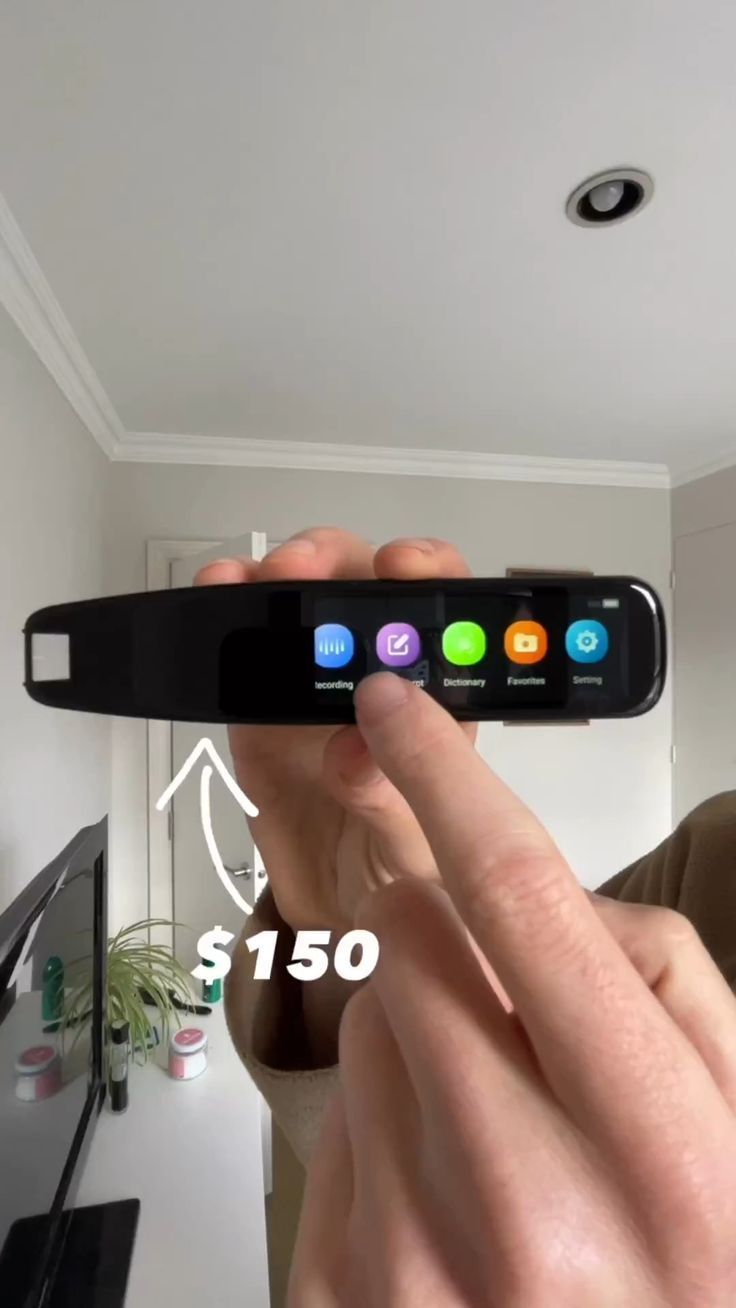
A pocket translator that scans printed text and speaks the result back instantly
This handheld translation pen scanner turns foreign-language print into readable, audible output without forcing you to type everything into a phone. From the images, it appears to be a slim, touchscreen-equipped model in the same class as the QibuQibu G6 Pro, combining text scanning, on-screen translation, voice playback, recording, and dictionary tools in one travel-friendly body.
The Standout Appeal & Why It Caught Our Attention
What makes this category so compelling is its speed. Instead of opening an app, framing text with a camera, and waiting for OCR to process, this pen is designed to glide directly across a line of printed text. That physical interaction is the whole point: it feels closer to highlighting than photographing. The result is a more natural tool for manuals, books, packaging, forms, and study materials.
- Self-contained workflow: screen, scanner, speaker, and controls are built into the pen itself.
- Offline usefulness: the video frames explicitly note support for Chinese, English, Korean, and Japanese without Wi-Fi, which is a major advantage for travel and classrooms.
- More than translation: menu icons show recording, dictionary, favorites, and settings, suggesting it also works as a language-learning and reference tool.
Key Features & How It Works
Visually, this is a black glossy scanner pen with a wide horizontal touchscreen, a scanning head at the tip, and side-mounted physical buttons. The hardware appears intentionally shaped so the user can hold it like a thick marker while dragging the sensor across text in a straight line.
- Optical scanning tip: the front end houses the text-scanning module that reads printed lines as the pen moves across the page.
- Touchscreen interface: the display shows app-style icons and translated text results, making it usable without pairing to another device.
- Audio playback: on-screen buttons labeled original and translation indicate text-to-speech for both the source language and translated output.
- Wi-Fi connectivity: one frame shows a network settings page, which likely enables cloud translation or expanded language support when online.
- Offline language pack support: the product appears to retain core scanning/translation for select languages even without internet access.
- Side controls: a blue rocker-style button and a red shortcut button are visible, likely for volume, scan activation, recording, or voice functions.
- Built-in utility apps: visible menu items include Recording, Dictionary, Favorites, and Settings, which add note-taking and study value beyond one-off translation.
The translated output shown in the frames suggests a typical workflow: scan a printed sentence, let the pen recognize the source language, then display and optionally speak the translated line. That makes it especially useful for short-form printed text where speed matters more than full-page document processing.
Practical Everyday Uses
This is the kind of tool that becomes most valuable when a phone feels clumsy, distracting, or too slow.
- Travel and transit: scan signs, printed instructions, museum labels, menus, or appliance guides when roaming without reliable data.
- Language learning: students can scan textbook passages, hear pronunciation, compare original and translated text, and save useful phrases to favorites.
- Work and importing: useful for reading packaging inserts, multilingual manuals, product labels, and printed documentation from overseas suppliers.
Things To Consider Before Buying
As clever as these pens are, they work best when expectations match the format they are designed for.
- Printed text works better than stylized layouts: clean, straight, high-contrast print is usually ideal; curved surfaces or decorative fonts may reduce accuracy.
- Offline language support is limited: confirm exactly which languages and translation directions are available without Wi-Fi.
- Brand and firmware matter: many near-identical models exist, so check update support, OCR accuracy, and menu language before choosing a seller.
- Not a full conversation translator replacement: this format excels at scanning text, while live speech translation may be more limited depending on the model.
- Learning curve: users may need a few tries to get the scanning speed and angle right for consistent recognition.
For readers, travelers, and students who regularly deal with foreign-language print, this pen offers a more tactile and immediate alternative to phone-based translation apps.