
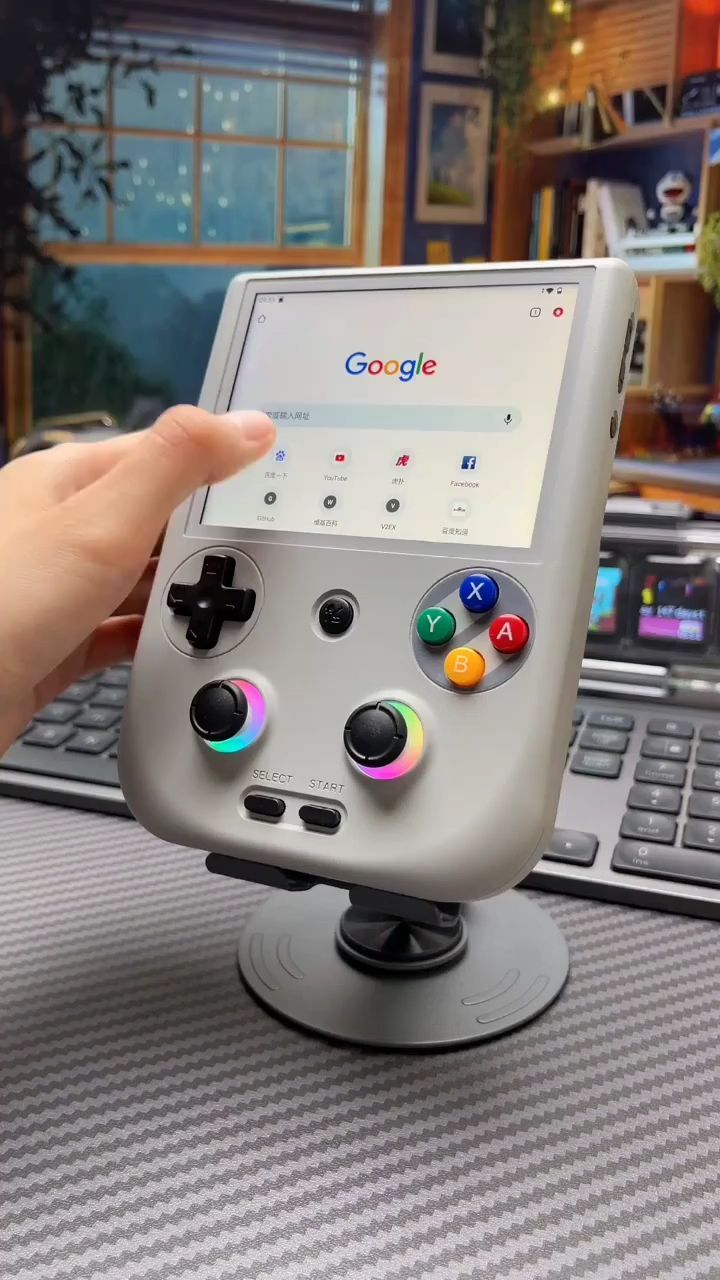
A retro handheld that doubles as a compact touchscreen gaming hub
This handheld console stands out because it blends old-school control hardware with a more modern interface: a large front-facing display, dual analog sticks, physical ABXY controls, and visible touch capability for browsing, setup, and emulator navigation. It is clearly designed for players who want the feel of classic portable gaming without being locked into one generation or one control style.
The Standout Appeal & Why It Caught Our Attention
Most retro handhelds lean heavily in one direction: either they mimic vintage hardware closely, or they chase smartphone-like flexibility and lose the tactile charm. This model sits in the middle. Its vertical Game Boy-style silhouette gives it immediate nostalgia, while the 4-inch IPS multi-touch screen, dual sticks, and app-style interface suggest a broader role than simple ROM playback.
- Vertical layout: easier one-handed pickup, compact footprint, and a familiar retro feel.
- Modernized controls: dual analog sticks expand compatibility for later-era emulation and 3D titles.
- Touchscreen interface: useful for menu navigation, settings, and light web or app interaction shown in the visuals.
- RGB-lit sticks: a small but effective design choice that gives the console a more contemporary desk-tech personality.
What makes it interesting is not just that it plays retro games, but that it appears built to make retro gaming feel less fiddly and more approachable for everyday use.
Key Features & How It Works
From the images and transcript context, this is a handheld retro emulator console with a 4-inch IPS multi-touch display and a full physical control set. The body appears to use a matte light-gray plastic shell with rounded edges for palm comfort during longer sessions.
- 4-inch IPS multi-touch screen: IPS panels are valued for better viewing angles and more consistent color than older budget LCDs. The touch layer makes menu navigation faster than relying only on buttons.
- D-pad plus ABXY cluster: the classic layout supports 2D platformers, fighters, puzzle games, and menu-heavy retro titles.
- Dual analog sticks: especially useful for PlayStation-era and later emulation, racing games, sports titles, and 3D movement.
- RGB halo lighting around both sticks: mostly aesthetic, but it also visually separates the analog controls in low light.
- Select and Start buttons: placed low on the face for traditional emulator mapping.
- Front center function button: likely used for system shortcuts, home access, or emulator controls depending on firmware.
- Preloaded game support and emulator capability: the transcript indicates built-in games and retro emulation, while the visuals show multiple game systems and interfaces in use.
- App/browser-style UI: some frames show web browsing and app-store-like screens, suggesting a more flexible software layer than a single-purpose cartridge-style system.
- Side ports and buttons: visible cutouts on the side indicate charging, audio, storage, or expansion access, though exact port types are not fully legible.
The overall mechanism is straightforward: load into the launcher, choose a system or title, then play using either the D-pad or analog sticks depending on the game. The touchscreen likely reduces setup friction when browsing libraries, changing settings, or handling emulator menus.
Practical Everyday Uses
This kind of handheld is most useful when you want a dedicated gaming device that is faster to pick up than a phone and more portable than a laptop or console.
- Commute and travel gaming: ideal for trains, flights, hotel downtime, or waiting rooms where a compact all-in-one emulator is easier than carrying multiple devices.
- Desk-side break machine: the included stand shown in the visuals makes it easy to keep on a work desk for short racing, sports, or arcade sessions between tasks.
- Retro library exploration: useful for players revisiting older systems, testing genres they missed, or introducing younger users to classic games through a more modern interface.
It also suits people who dislike touch-only gaming and want real buttons, real sticks, and a dedicated screen without notifications interrupting play.
Things To Consider Before Buying
Before ordering, it is worth checking the exact hardware and software version, because retro handhelds often vary by seller even when the shell looks identical.
- Confirm the operating system and emulator support: performance can differ significantly depending on firmware and chipset.
- Check storage details: verify whether games are preloaded on internal memory or microSD, and whether expansion is supported.
- Review port selection: make sure it has the charging, headphone, and data options you expect.
- Understand touchscreen limits: touch is helpful for navigation, but the core experience is still centered on physical controls rather than tablet-style use.
- Expect variation in game legality and curation: preloaded libraries can differ by region and seller, so buyers should verify what is actually included.
- Ergonomics matter: the vertical shape is compact and nostalgic, but players with larger hands may want to compare it with wider horizontal handhelds for long sessions.
If you want a handheld that feels more substantial than a phone emulator setup and more versatile than a single-system retro clone, this style of console makes a strong case through its touchscreen convenience, dual-stick control layout, and compact nostalgia-first design.