
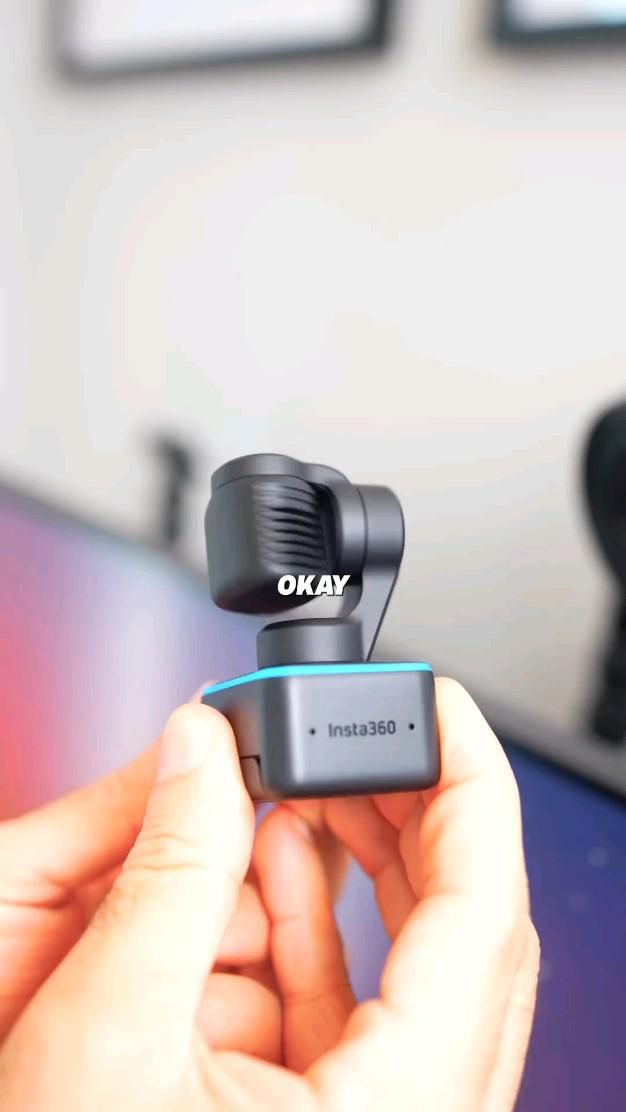
A 4K webcam that physically follows you instead of forcing you to stay glued to one spot
The Insta360 Link takes the usual static webcam formula and upgrades it with something most desktop cameras simply do not have: a motorized physical gimbal. That means the camera can pan and tilt to keep you framed, switch to overhead views for demos, and feel much closer to a compact production tool than a basic video-call accessory.
The Standout Appeal & Why It Caught Our Attention
Most webcams improve image quality but still leave you stuck with a fixed angle. The Link stands out because its intelligence is paired with actual movement. Instead of digitally cropping a wide shot and sacrificing detail, it can reposition the lens itself to track a speaker or jump between saved viewpoints. That makes it especially compelling for creators, remote workers, teachers, and anyone who regularly shows more than just their face on camera.
- Physical gimbal tracking gives it a more cinematic, responsive feel than a standard clip-on webcam.
- 4K capture helps preserve facial detail, text clarity, and cleaner-looking video for meetings or recorded content.
- Preset angle switching makes it practical for workflows that alternate between talking-head framing and desk demonstrations.
Key Features & How It Works
Visually, the camera uses a compact dark-gray body with a small lens module mounted on a two-axis gimbal head, sitting above a monitor clip base. A colored status light ring around the base provides quick visual feedback, and the unit connects by cable for continuous desktop use. The design is intentionally compact so the moving head can rotate freely without taking over the top of your monitor.
- AI subject tracking: The camera detects and follows your movement, keeping you centered as you shift, stand, or present.
- Gimbal stabilization and motion: Because the lens physically pans and tilts, framing changes look smoother and more deliberate than software-only tracking.
- Top-down mode: A major practical advantage for product demos, sketching, note-taking, keyboard builds, or showing items on a desk.
- Gesture controls: Hands-free commands let you trigger tracking or framing changes without reaching for software menus mid-call.
- Monitor-mount form factor: The integrated clip keeps it easy to place on a display, while the compact base helps it sit securely in a typical desk setup.
- 4K resolution: Useful not just for sharpness, but for maintaining a more polished image when presenting professionally.
Practical Everyday Uses
This is the kind of webcam that becomes more valuable the moment your camera needs go beyond a simple face shot.
- Remote work and meetings: If you tend to stand, whiteboard, or move around while presenting, the tracking keeps you in frame without constant manual adjustment.
- Desk-demo content: Great for creators showing keyboards, gadgets, drawings, packaging, or repair work thanks to the overhead-style viewing option.
- Online teaching and coaching: Instructors can switch between face view and demonstration view more fluidly, which makes lessons feel more dynamic and easier to follow.
Things To Consider Before Buying
The Link is more advanced than a basic webcam, so it makes sense to check whether its strengths match your setup and workflow.
- Best for active camera use: If you only sit still for occasional calls, a simpler webcam may be enough.
- Software and compatibility: Confirm support for your operating system and the apps you use most for meetings, streaming, or recording.
- Desk placement matters: The gimbal needs a clear range of motion, so very tight monitor shelves or unusual mounting positions can limit its movement.
- Power and cable management: Since it is a wired desktop camera, plan for a clean cable route around your monitor.
- Learning curve: Features like gesture control, presets, and tracking modes are useful, but you will get the most from them if you spend a little time setting them up properly.