
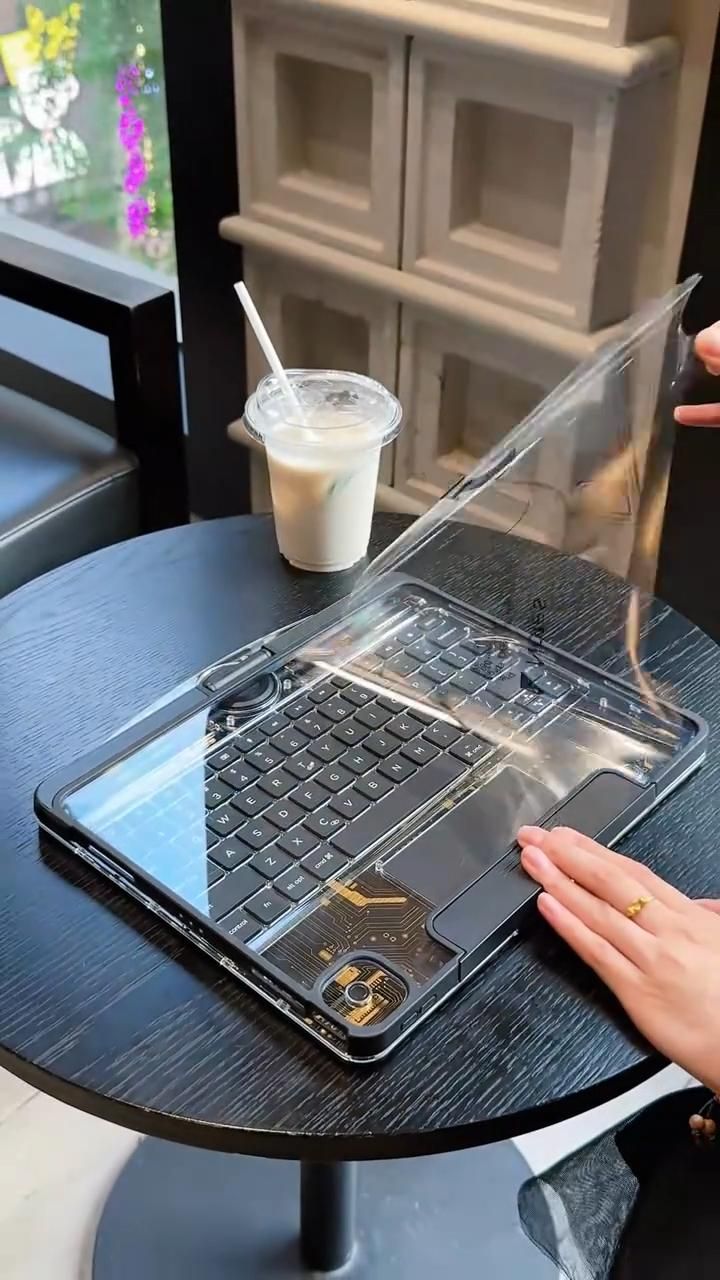
A transparent iPad keyboard case that rotates, types, and flips into multiple work modes
This is a 360-degree rotating transparent iPad keyboard case built for people who want laptop-style productivity without giving up tablet flexibility. Instead of hiding the hardware, it leans into a futuristic exposed-circuit look, pairing a clear shell with a full keyboard, large trackpad, and a swivel hinge that lets the iPad move between typing, viewing, presentation, and tablet positions.
The Standout Appeal & Why It Caught Our Attention
Most iPad keyboard cases try to disappear. This one does the opposite. Its appeal comes from combining a cyber-mechanical transparent aesthetic with a genuinely useful hinge system. The clear housing shows off decorative board-style traces and internal structural elements, giving it a Y2K-tech look that feels closer to custom desktop gear than a standard folio case.
- Visual identity with function: the transparent body is not just decorative; it also makes the case feel lighter and more architectural than bulky fabric folios.
- Laptop-to-tablet flexibility: the rotating hinge solves one of the biggest iPad accessory frustrations—having to remove the tablet or awkwardly fold the whole case when switching tasks.
- Desk-setup energy in a mobile form: the exposed-circuit styling and likely multi-color backlighting make it feel designed for people who care about both workflow and aesthetics.
Key Features & How It Works
From the images and provided context, this case appears to use a hard transparent acrylic or polycarbonate shell around a keyboard base with a central swivel hinge. The iPad mounts into a protective frame, then rotates on the hinge so the screen can face forward, backward, or fold into alternate positions.
- 360-degree swivel hinge: the center-mounted rotating mechanism allows horizontal rotation and full flip-around use, making it easier to switch between typing mode, touch mode, and screen-sharing mode.
- Transparent chassis: the base and surrounding frame reveal gold-toned circuit-style graphics and internal layers, creating a mechanical-tech appearance.
- Integrated keyboard: a full compact keyboard layout is built into the lower half, giving the iPad a clamshell laptop format for writing, editing, and general productivity.
- Large trackpad: the oversized trackpad adds cursor control and gesture navigation, which is especially useful for multitasking in iPadOS.
- Protective front film or clear cover layer: the visuals show a removable protective sheet over the transparent surface, suggesting glossy hard-shell construction.
- Apple Pencil accommodation: the top edge appears to leave room for stylus placement or magnetic charging, important for note-takers and illustrators.
- Backlit keyboard styling: based on the provided product info, many versions include RGB or 7-color backlighting, which improves low-light visibility and reinforces the cyber aesthetic.
- Multi-angle support: beyond simple opening and closing, the hinge geometry supports upright viewing and tent-like or reversed display positions.
Practical Everyday Uses
This kind of case is most useful for people who regularly move between content creation, browsing, and touch-first tablet tasks.
- Cafe or travel workstation: turn the iPad into a compact laptop for email, documents, and web work, then rotate the screen back when you want to read, sketch, or watch without detaching anything.
- Student and note-taking setup: type lecture notes with the keyboard, use the trackpad for quick navigation, and keep an Apple Pencil on hand for markup or handwritten diagrams.
- Presentation and media mode: flip the display outward to show a client, friend, or classmate something on-screen without forcing them to look over your shoulder.
Things To Consider Before Buying
Before choosing one of these cases, it is worth checking the exact fit and feature set carefully, since transparent rotating keyboard cases often vary by iPad generation and seller.
- Model compatibility matters: confirm the exact iPad size and camera cutout alignment, especially for Pro, Air, and different generation models.
- Weight and thickness: a hard-shell keyboard case with a rotating hinge will usually be heavier than a slim folio, so it is better for bag carry than one-handed reading.
- Keyboard switch feel: some listings may describe the keys as mechanical-style rather than true full mechanical switches, so check travel, noise level, and layout details.
- Charging and connectivity: verify whether the keyboard uses Bluetooth, pogo-pin connection, or USB-C charging, and whether backlighting affects battery life.
- Glossy transparent surfaces: clear shells look striking, but they can show fingerprints and micro-scratches more easily than matte cases.