
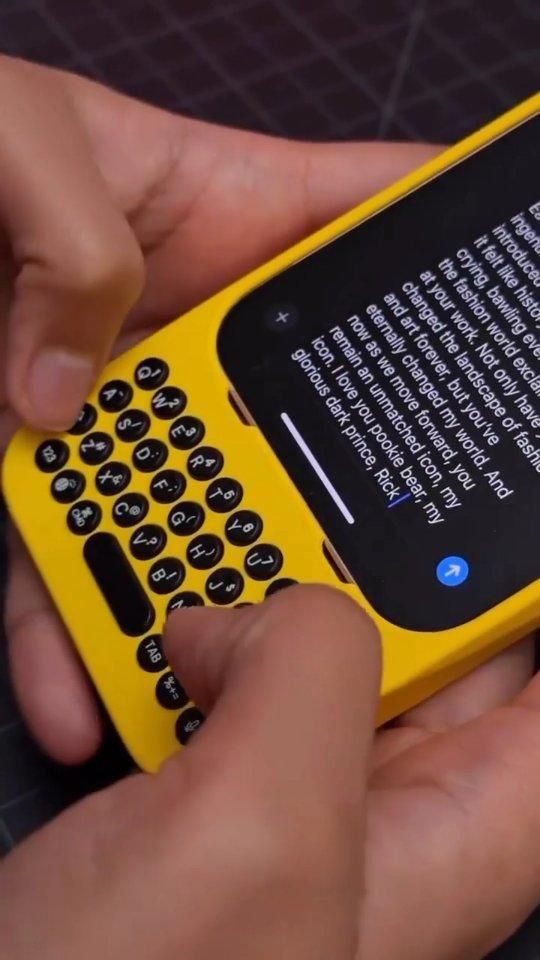
A physical iPhone keyboard case that gives your screen back
The Clicks Keyboard is a snap-on iPhone case with a built-in physical keyboard at the bottom, reviving the old BlackBerry-style typing experience in a modern Apple-friendly form. Its appeal is simple but surprisingly practical: by moving typing off the touchscreen, it frees up more visible screen space for messages, notes, email, and apps while adding tactile keys, shortcuts, and a very distinct feel in the hand.
The Standout Appeal & Why It Caught Our Attention
Most phone accessories try to disappear. This one does the opposite. The Clicks case intentionally changes how you use an iPhone by adding real thumb keys below the display. That makes it unusual, but not pointless. For people who write a lot on their phone, the design solves two real annoyances: the on-screen keyboard covering content and the lack of tactile feedback when typing quickly.
- More usable display area: because the keyboard is physical, the iOS software keyboard no longer needs to occupy the lower half of the screen.
- Tactile typing: each keypress gives a defined click, which can improve confidence for users who miss physical buttons.
- Retro-meets-modern design: it clearly borrows from classic messaging phones, but integrates with current iPhone hardware and software.
Key Features & How It Works
From the packaging and hands-on views, this is the Clicks Keyboard for iPhone in Onyx, with other bright colorways also shown. The phone slides into the case and connects through the bottom port via an integrated connector, so it behaves more like a direct hardware accessory than a separate Bluetooth keyboard.
- Integrated physical keyboard: compact round keys arranged for two-thumb typing, plus a central space bar and dedicated function keys.
- Shortcut and command support: visible keys include CMD, 123, microphone, shift, and tab, enabling iOS shortcuts, dictation access, symbol switching, and navigation without constant screen taps.
- Backlit keys: the box confirms illuminated keys for low-light typing.
- MagSafe support: the rear of the case shows the magnetic charging ring layout, and promotional frames show it resting on a wireless charging stand.
- Clicks app customization: packaging indicates software customization for key behavior and settings.
- Case-style protection: it wraps the phone edges and camera area like a fitted protective shell, not just a keyboard add-on.
- Easy on/off fitment: the included guide suggests a specific insertion angle because the connector seats into the phone as it slides in.
The overall build appears to use a matte polymer shell with slightly raised, glossy black keycaps. The shape is intentionally elongated, turning the iPhone into a taller messaging-first device.
Practical Everyday Uses
This is most useful for people who treat their phone like a pocket writing tool rather than just a scrolling screen.
- Heavy texters and DM users: if you spend hours in Messages, WhatsApp, Slack, or email, the physical keys can make long conversations feel more deliberate and less cramped.
- Mobile note-takers: in Notes, reminders, and drafting apps, the extra visible screen space is genuinely helpful because you can see more of what you are writing.
- Commuters and one-device workers: anyone replying to clients, editing quick copy, or managing social posts from an iPhone may appreciate hardware shortcuts and less screen obstruction.
Things To Consider Before Buying
The Clicks concept is clever, but it is not universally practical. Buyers should think about ergonomics and compatibility before jumping in.
- It makes the phone longer: portability changes noticeably. Pocket fit and one-hand balance may be worse than with a normal case.
- There is a learning curve: if you have spent years on glass keyboards, your thumbs may need time to adapt to physical key spacing.
- Model-specific fit matters: this version is labeled for iPhone, so buyers need to choose matching case for the iPhone version.
- Charging and power behavior: while it supports MagSafe, some users may want to monitor battery impact since hardware accessories can affect phone power use.
- It is a premium accessory: part utility, part nostalgia object. The value depends heavily on how much typing you actually do on your phone.
In short, the Clicks Keyboard is not a universal must-have, but it is far more than a novelty. For the right user, it turns the iPhone into a more tactile, screen-efficient communication tool with a personality most accessories completely lack.