
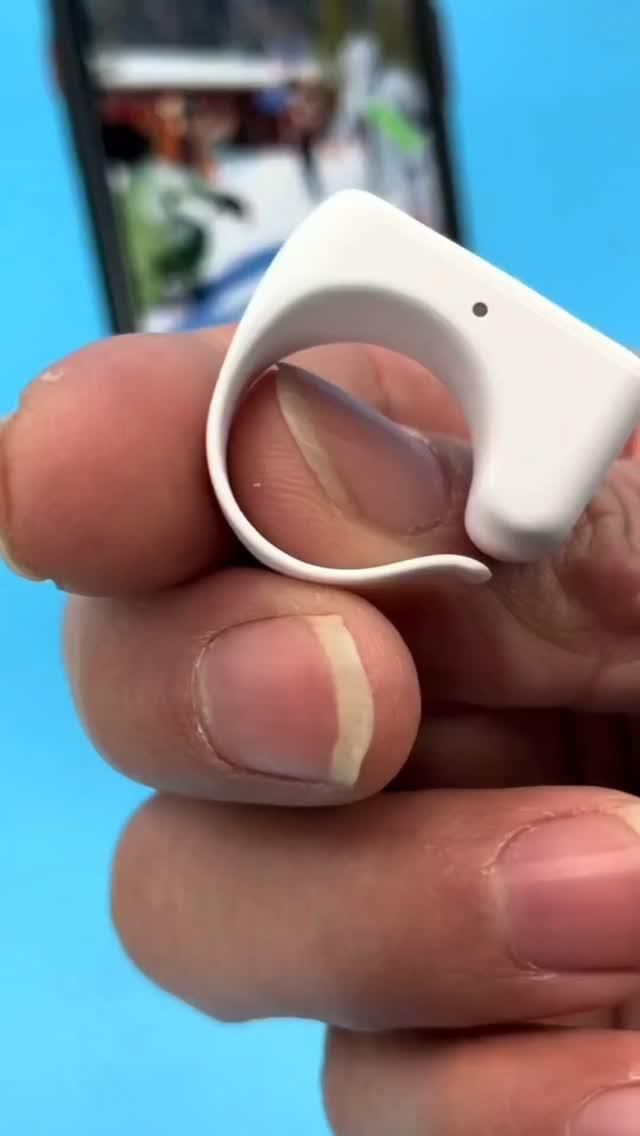
A wearable Bluetooth remote that lets you scroll, turn pages, and trigger your phone camera without touching the screen
This compact ring-style Bluetooth remote is built for one very modern problem: using your phone when your hands are busy, your device is mounted, or you simply do not want to keep tapping the screen. Worn on a finger like a lightweight clip-on ring, it works as a wireless page turner, short-video scroller, and remote shutter control for smartphones, making it especially useful for TikTok-style browsing, reading, filming, and hands-free viewing.
The Standout Appeal & Why It Caught Our Attention
What makes this item interesting is how it turns a familiar phone task into something almost frictionless. Instead of holding your phone for every swipe, tap, or shutter press, this remote moves those controls to your finger. That sounds simple, but in practice it changes how you use a phone on a stand, at a desk, in bed, or while filming yourself from a distance.
- Wearable format: The ring-style body stays on your finger, so it is harder to misplace than a tiny loose remote.
- Minimal physical interface: The small raised buttons are designed for tactile use without needing to look down constantly.
- Useful beyond selfies: It is not just a camera trigger; it also helps with scrolling short videos and turning digital pages, which broadens its appeal.
- Desk-friendly design: The included charging tray/stand setup shown in the demo suggests it is meant to live near your phone, ready for repeated daily use.
Key Features & How It Works
The product appears to use Bluetooth wireless pairing with smartphones, including iPhones and other compatible devices. Its compact shell is described as ABS material, which makes sense for a wearable remote because ABS is lightweight, rigid, and durable enough for repeated button presses.
- Ring clip construction: The open finger loop allows quick wear and removal while keeping the control body positioned near the thumb for easy pressing.
- Multi-button control layout: The remote shown has distinct front buttons, likely mapped to actions such as scroll up/down, page turning, or camera shutter.
- Status indicator light: A small LED dot is visible on the body, useful for pairing and battery-status feedback.
- Rechargeable battery: The transcript mentions long endurance and a charging tray, which is more convenient than disposable coin-cell remotes.
- Phone stand compatibility: The demonstrations consistently show the phone upright on a stand, highlighting the intended use case of remote control from a short distance.
- Remote camera triggering: In camera mode, the clicker can act as a wireless shutter button for selfies, group shots, or solo content creation.
Mechanically, the appeal is straightforward: pair it once, wear it on a finger, and use thumb presses to send commands to the phone. That makes it feel more like a tiny wearable controller than a traditional remote.
Practical Everyday Uses
This is one of those small accessories that becomes more useful the more often your phone sits on a stand instead of in your hand.
- Hands-free scrolling at home: If you watch TikTok, Reels, or Shorts while eating, exercising lightly, or lying in bed, the remote lets you keep browsing without reaching for the screen every few seconds.
- Remote selfies and solo filming: For creators, travelers, or anyone taking outfit shots, the shutter function helps capture photos and videos from a more natural distance without awkward timer runs.
- Reading and page turning: It can be useful for digital reading, teleprompting, or script review when your phone or tablet is propped up on a desk.
Things To Consider Before Buying
As clever as it is, this type of accessory works best when expectations are realistic and compatibility is checked first.
- App compatibility matters: Not every phone app interprets Bluetooth button commands the same way, so confirm it supports the scrolling or page-turning behavior you want.
- Phone model support: It is commonly marketed for iPhone and other smartphones, but exact functions can vary by operating system and app permissions.
- Learning the button mapping: Because the remote is tiny, there may be a short adjustment period before the controls become muscle memory.
- Charging routine: Since it is rechargeable, it is worth checking battery life claims and whether the charging tray is included in the exact listing you buy.
- Best for mounted-phone use: Its biggest advantage shows up when your phone is on a stand, tripod, or desk mount rather than already in your hand.