
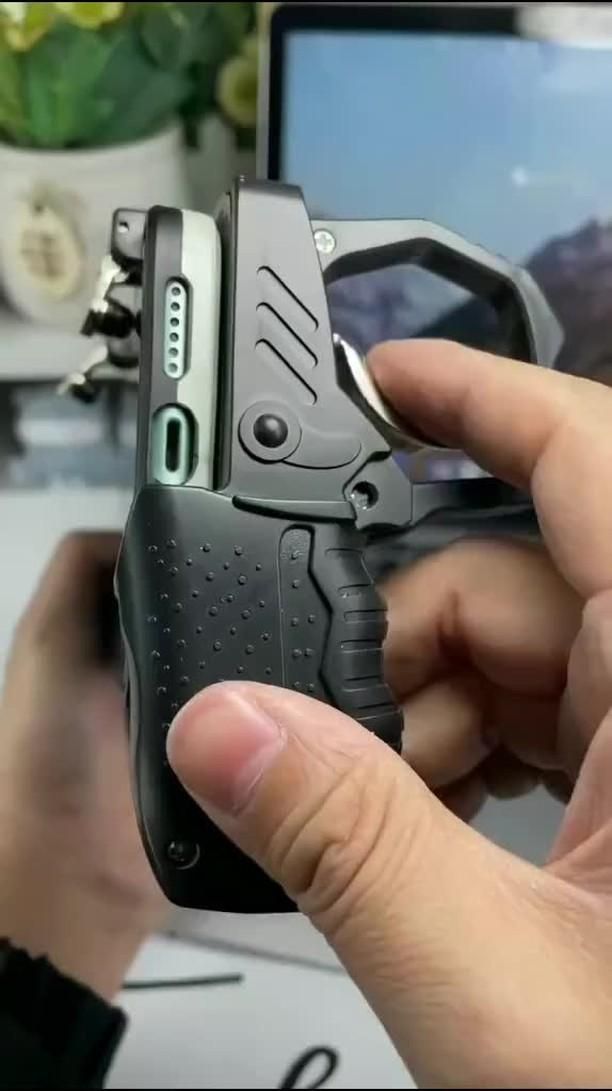
A console-style grip that gives touchscreen shooters real trigger control
Mobile shooters often ask your thumbs to do everything at once: move, aim, fire, and manage on-screen buttons without blocking the display. This 4-in-1 mobile gamepad controller tackles that problem with a hybrid design that adds physical L1/R1 trigger buttons, side grips, and a more stable handheld shape so your phone feels closer to a compact controller than a slippery slab of glass.
The Standout Appeal & Why It Caught Our Attention
What makes this accessory interesting is that it does not try to replace the phone with a full Bluetooth controller. Instead, it uses a mechanical clip-on approach that keeps the touchscreen active while moving the most important shooter inputs to tactile triggers. That matters in battle royale and FPS games where split-second firing and aiming can be awkward on a flat screen.
The design also stands out for its pistol-grip-inspired ergonomics. The textured handles and finger trigger loops give your hands a more natural position during longer sessions, reducing the cramped thumb posture common with bare-phone gaming.
Key Features & How It Works
This controller appears to use a stretchable central frame that clamps onto a smartphone in landscape orientation, with two top-mounted trigger mechanisms that physically tap the screen where your fire or aim buttons are placed in-game.
- Dual L1/R1 trigger clips: Metal-tipped contact arms sit over the top edge of the phone and translate finger presses into screen taps.
- 4-in-1 control concept: Lets players combine movement, aiming, firing, and camera control more efficiently by shifting some actions off the thumbs.
- Textured side grips: The black molded handles feature dotted anti-slip texture and finger grooves for a steadier hold.
- Mechanical trigger action: The visible hinged trigger assembly suggests a spring-loaded press with short travel for faster repeated shots.
- Expandable body: The center section appears adjustable to fit different phone widths.
- No charging shown: Based on the visuals, this looks like a non-powered mechanical accessory, which means no battery pairing or charging routine.
Practical Everyday Uses
This kind of controller is most useful for players who like competitive mobile games but do not want to carry a full-size controller everywhere.
- Battle royale sessions: In games like PUBG Mobile or similar shooters, you can map the top triggers to aim and fire while keeping your thumbs free for movement and camera control.
- Commuting or travel play: It adds a more secure grip for gaming in a car, on a train, or while sitting in a waiting room where a bare phone can feel awkward to hold for long matches.
- Longer evening gaming sessions: The handles can reduce hand fatigue compared with pinching the edges of a phone for an hour or more.
Things To Consider Before Buying
Before picking one up, check the fit and your game layout carefully. Mechanical trigger accessories work best when your game allows custom button placement near the top corners of the screen.
- Phone compatibility: Make sure the clamp width matches your phone, especially if you use a thick case or a large camera bump.
- Screen layout setup: You may need to reposition on-screen fire and aim buttons so the trigger contacts hit the correct spots.
- Case interference: Rugged cases can prevent the trigger clips from making clean contact with the display.
- Game rules: Some competitive titles or tournaments may have specific policies on external trigger accessories.
- Learning curve: If you are used to pure touchscreen play, expect a short adjustment period before the trigger placement feels natural.