
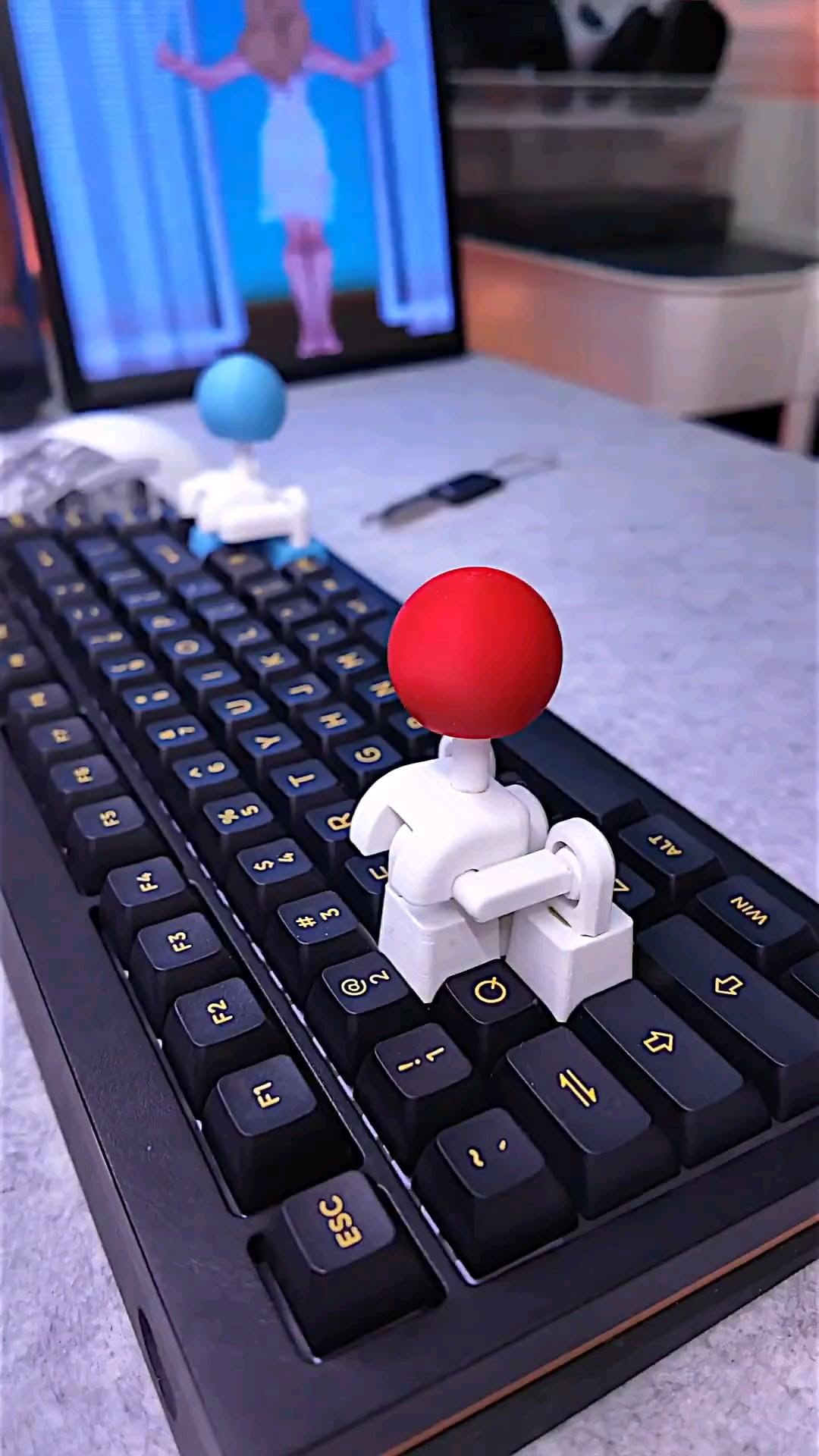
A tiny arcade stick that turns four keyboard switches into a tactile mini controller
The FunOrNothing 3D-printed Joystick Keycap is one of those rare desk accessories that is both playful and genuinely functional. Instead of acting like a normal decorative artisan cap, it bridges across a cluster of mechanical keyboard switches and uses a movable lever to trigger directional inputs, giving your keyboard a compact arcade-style control point for gaming, testing movement inputs, or simply fidgeting at your desk.
The Standout Appeal & Why It Caught Our Attention
Most artisan keycaps are purely visual. This one adds a physical mechanism you can actually interact with. Its appeal comes from the clever idea of using the existing cross-stem mechanical switch layout as the foundation for a joystick-like input system. In other words, it doesn’t need batteries, drivers, or a separate controller shell to feel novel. It repurposes the keyboard you already own into something closer to a miniature fight-stick.
- Functional novelty: more than a display piece, it creates directional movement through real switch presses.
- Arcade-inspired feel: the ball-top lever mimics the visual language of classic cabinets in a much smaller format.
- Desk personality: the 3D-printed body and colorful ball top make it stand out in custom keyboard setups.
Key Features & How It Works
From the images, this appears to be a 3D-printed multi-key joystick attachment designed to mount over a group of adjacent mechanical switches, most likely in a WASD-style arrangement. The central lever pivots inside a printed housing, and side arms or contact points transfer motion into individual key presses depending on the direction you push.
- Ball-top joystick cap: the rounded top gives your fingers a familiar arcade grip and makes quick directional flicks easier than pressing separate keycaps one by one.
- Mechanical lever action: when the stick is tilted, the housing appears to press one of several underlying switches, translating physical movement into keyboard input.
- Cross-axis switch compatibility: it is intended for standard mechanical keyboard stems, the common plus-shaped mount used by many MX-style switches.
- 3D-printed construction: the body looks lightweight and modular, which suits custom colors, replacement parts, and artisan-style small-batch production.
- Multi-key footprint: unlike a single novelty cap, this spans several keys, so the joystick can simulate directional control across multiple switches.
- Decorative and tactile value: even when not used for games, it works as a movable desk fidget integrated directly into the keyboard.
Practical Everyday Uses
This is a niche accessory, but in the right setup it becomes surprisingly useful and entertaining.
- Fighting game and retro game setups: players can map movement to a four-key cluster and get a more joystick-like feel for emulators, arcade titles, or experimental control schemes.
- Custom desk builds: keyboard enthusiasts can use it as a centerpiece on a macro pad or secondary board, especially in themed gaming or maker setups.
- Stress-relief fidgeting: during calls, loading screens, or breaks, the lever gives your hands something tactile to do without reaching for a separate toy.
Things To Consider Before Buying
This is a clever accessory, but it is not universal in the way a normal keycap is. Buyers should check fit and expectations carefully.
- Keyboard compatibility matters: confirm your board uses MX-style cross stems and has the right spacing around the intended key cluster.
- It occupies multiple keys: installing it means sacrificing a small group of keys, so it makes the most sense on spare clusters, macro pads, or dedicated gaming layouts.
- 3D-printed finish can vary: artisan-style printed parts may show layer lines or slight tolerance differences compared with injection-molded accessories.
- Learning curve: it won’t fully replace a real arcade stick, so expect it to feel more like a compact hybrid input mod than a tournament controller.
- Switch feel affects performance: lighter or smoother switches underneath may change how responsive the joystick feels in use.