
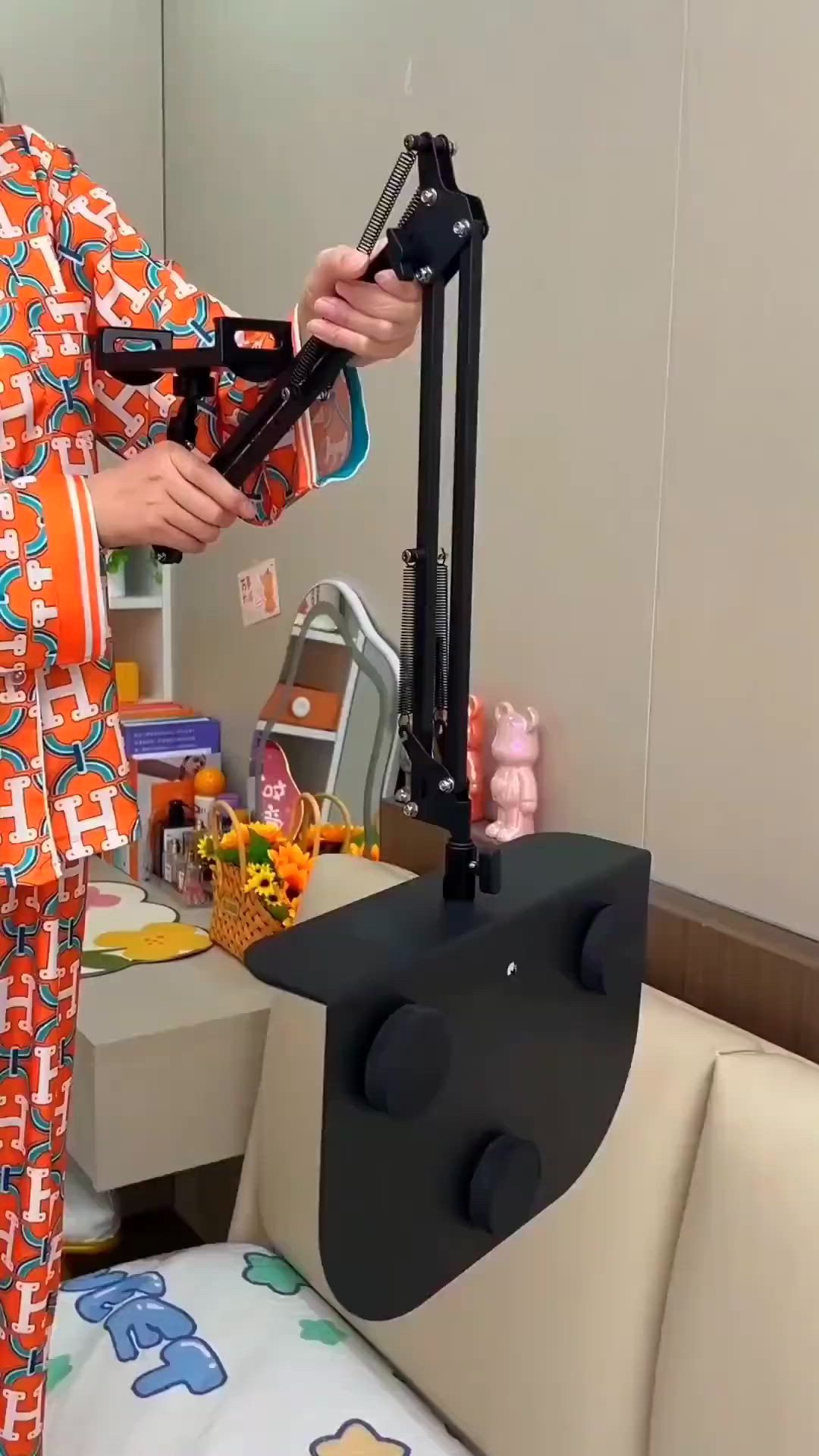
A spring-balanced bedside stand that brings your phone or tablet exactly where you want it
This 360° adjustable bed mobile stand is built for one very specific modern problem: using a screen comfortably while lying down, sitting on a sofa, or relaxing in bed without constantly propping it up with pillows or straining your wrists. From the images, it uses a weighted floor or bedside base, a multi-joint scissor arm with exposed tension springs, and a rotating device clamp that can hold either a phone or a larger tablet. The result is a more stable, more ergonomic alternative to handheld scrolling or balancing a device on your lap.
The Standout Appeal & Why It Caught Our Attention
What makes this stand interesting is that it combines the logic of a studio boom arm with the convenience of a bedside accessory. Instead of a flimsy gooseneck that droops under weight, this design appears to use mechanical spring tension and pivoting metal arms to keep a screen suspended in place. That matters because the whole point of a bed stand is not just reach, but position retention—you want the screen to stay where you leave it.
It also stands out for its flexibility. The same structure shown over a bed is also used upright on the floor with a tablet attached, suggesting it can shift between lounging, reading, streaming, video calls, and hands-free browsing. It is essentially a personal screen mount for spaces where desks are inconvenient.
Key Features & How It Works
The visible design suggests a focus on stability, articulation, and compatibility across different device sizes.
- 360° rotating holder: The clamp head appears to rotate, allowing quick switching between portrait and landscape orientation for reading, watching video, or video chatting.
- Spring-assisted articulated arm: The black metal arm uses exposed springs and multiple hinge points, helping counterbalance the weight of a phone or tablet while making height and reach adjustments smoother.
- Extended reach over bed or sofa: The arm can project outward from the base so the device hovers above a pillow, chest, or lap area rather than needing a nearby table.
- Heavy support base: The stand is shown with a broad, flat base and also a padded bedside support panel, indicating a design intended to resist tipping while supporting larger screens.
- Phone and tablet compatibility: One image shows a smartphone in the clamp, while another shows a full-size tablet, so the holder likely expands to fit multiple device widths.
- Multi-angle viewing: Several joints allow the screen to be raised, lowered, tilted closer, or moved off to the side when not in use.
- Metal frame construction: The arm appears to be made from painted metal with bolted joints, which is typically more durable and less wobbly than plastic alternatives.
Practical Everyday Uses
This is the kind of stand that becomes most useful in routines where your hands, neck, or posture would otherwise do too much work.
- Bedtime streaming and scrolling: Ideal for watching shows, reading webtoons, or browsing social media while lying flat without holding a phone above your face.
- Hands-free tablet reading: Useful for e-books, recipes, online classes, or long-form articles when you want a larger screen positioned at eye level.
- Recovery, rest, or low-mobility use: Particularly helpful for people spending extended time in bed or on a sofa who still want easy access to video calls, entertainment, or study material.
Things To Consider Before Buying
Before choosing a stand like this, it is worth checking a few practical details so the setup matches your space and devices.
- Device size and weight limits: Make sure the clamp can securely hold your specific phone or tablet, especially if you use a large tablet with a thick case.
- Base clearance and room layout: Confirm you have enough space beside the bed, sofa, or chair for the base and arm swing range.
- Arm tension and adjustment effort: Spring-loaded arms are usually more stable, but they may require two hands to reposition smoothly, especially with heavier tablets.
- Viewing distance: A long reach is useful, but you will want the arm to retract easily too, so it does not feel intrusive when not in use.
- Clamp pressure on device edges: If your tablet has side buttons, charging cables, or a folio case, check whether the holder design leaves enough clearance.