
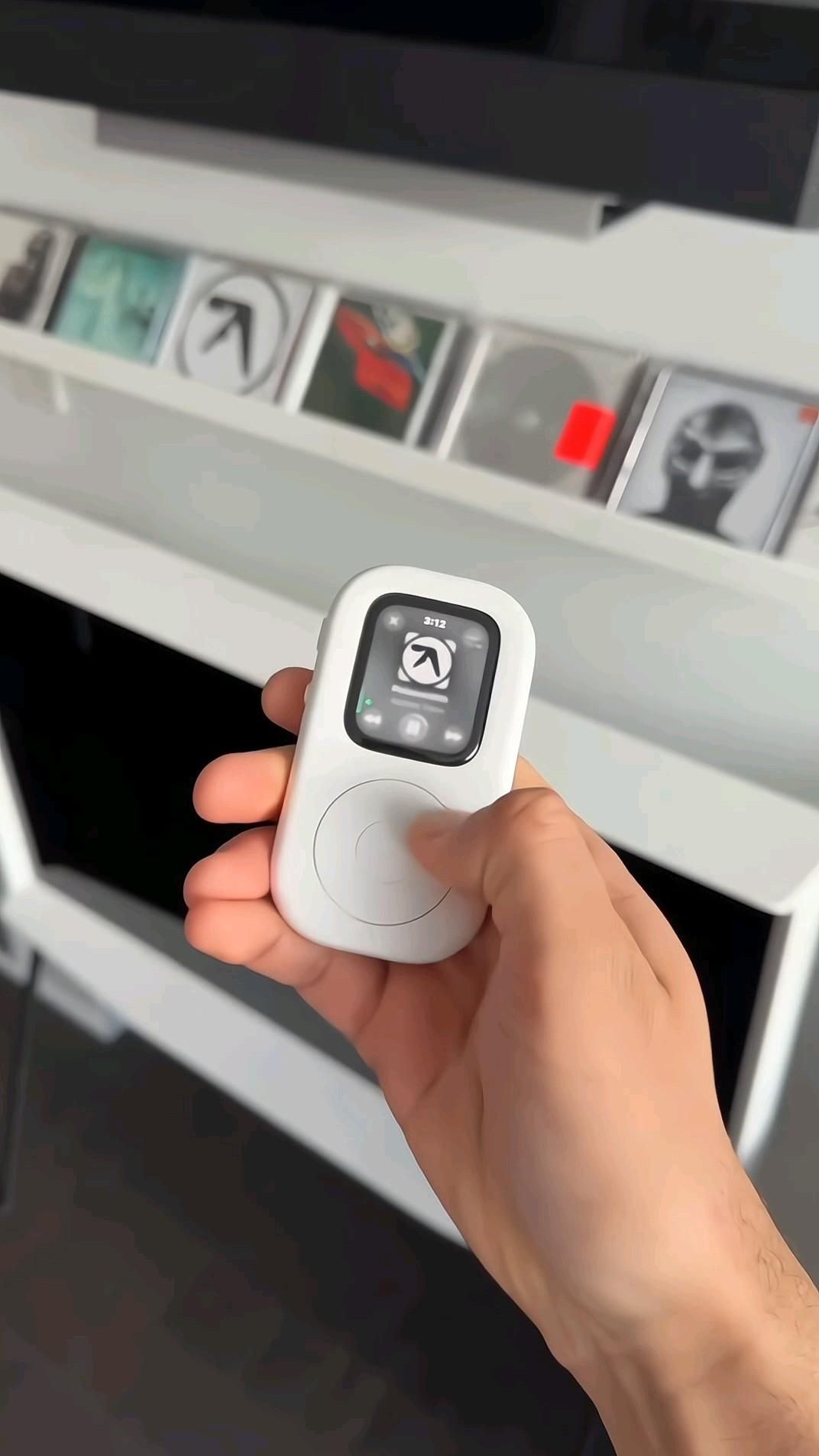
An Apple Watch case that turns your wrist computer into a pocketable iPod-style music player
The TinyPod is a cleverly engineered hard case that lets you dock an Apple Watch into a handheld shell inspired by the classic iPod. Instead of being a novelty prop, it preserves the watch’s real functionality while adding a tactile working scroll wheel, giving your Apple Watch a completely different personality: less smartwatch-on-your-body, more focused mini media player in your hand.
The Standout Appeal & Why It Caught Our Attention
What makes TinyPod interesting is that it does not try to imitate an old iPod with fake electronics. It repurposes a real Apple Watch into a distraction-light handheld device that still streams music, handles calls, texts, Siri, Bluetooth audio, and even Apple Pay. That makes it more practical than a pure retro toy and more intentional than carrying a full phone everywhere.
- Retro form, modern function: it delivers the emotional appeal of an iPod silhouette without giving up streaming or wireless connectivity.
- Focus-first design: paired with a cellular Apple Watch, it becomes a compelling phone alternative for walks, workouts, errands, or time away from your main smartphone.
- Physical interaction: the scroll wheel adds tactile control that feels more deliberate than swiping on a tiny watch screen.
Key Features & How It Works
TinyPod appears to use a two-piece plastic hard case that encloses the Apple Watch body while leaving the display exposed through a front window. The watch screen remains touch-accessible, and the side controls stay reachable, so you are not losing the native Apple Watch interface.
- Functional scroll wheel: the large circular wheel on the front mechanically interfaces with the watch’s crown system, allowing real scrolling input rather than decorative movement.
- Center button styling: the center area visually completes the iPod look, though the transcript notes the center button does not function as a true click control.
- Hard shell construction: the smooth white enclosure gives it a classic music-player look while making the tiny watch easier to grip and use one-handed.
- Touchscreen still works: menus, playback controls, keypad entry, and app interactions can still be done directly on the Apple Watch display.
- Bluetooth support: you can pair earbuds or speakers, which is essential for using it as a standalone music player.
- Cellular-friendly concept: with a cellular Apple Watch installed, TinyPod can stay connected for calls and texts without requiring your iPhone in hand.
- Broad compatibility: the provided info indicates support across most Apple Watch models, including Ultra variants, with Series 10 currently excluded.
One important mechanical note: the scroll wheel reportedly works, but requires noticeable force to actuate. That means the tactile novelty is real, but it may not feel as effortless as Apple’s original click wheel devices.
Practical Everyday Uses
TinyPod is most useful when you want the benefits of Apple’s ecosystem without the constant pull of a full smartphone screen.
- Walking, commuting, and coffee runs: load in a cellular Apple Watch and you can stream music, answer calls, and check messages while leaving your phone behind.
- Gym and outdoor sessions: it gives you easier handheld music control than tapping a watch on your wrist, especially when changing tracks or volume between sets.
- Digital-minimalist setup: for people trying to reduce screen time, it creates a middle ground between total disconnection and carrying a distraction-heavy phone.
Things To Consider Before Buying
TinyPod is a smart accessory, but it makes the most sense for a specific kind of user.
- You need an Apple Watch first: this is a shell accessory, not a standalone player with its own electronics.
- Check exact watch size compatibility: versions are sold by Apple Watch dimensions, so buyers should confirm their case size before ordering.
- Series 10 support is not available yet: if you own the newest unsupported model, verify compatibility before purchasing.
- Scroll feel is part of the tradeoff: the wheel works, but may require more pressure than expected if you are hoping for a silky vintage iPod feel.
- Center button is not functional: the design is visually faithful, but not every front control behaves like a classic iPod.
- Best with cellular models: GPS-only Apple Watches can still work for local functions and paired use, but the phone-free lifestyle pitch is strongest with cellular connectivity.