
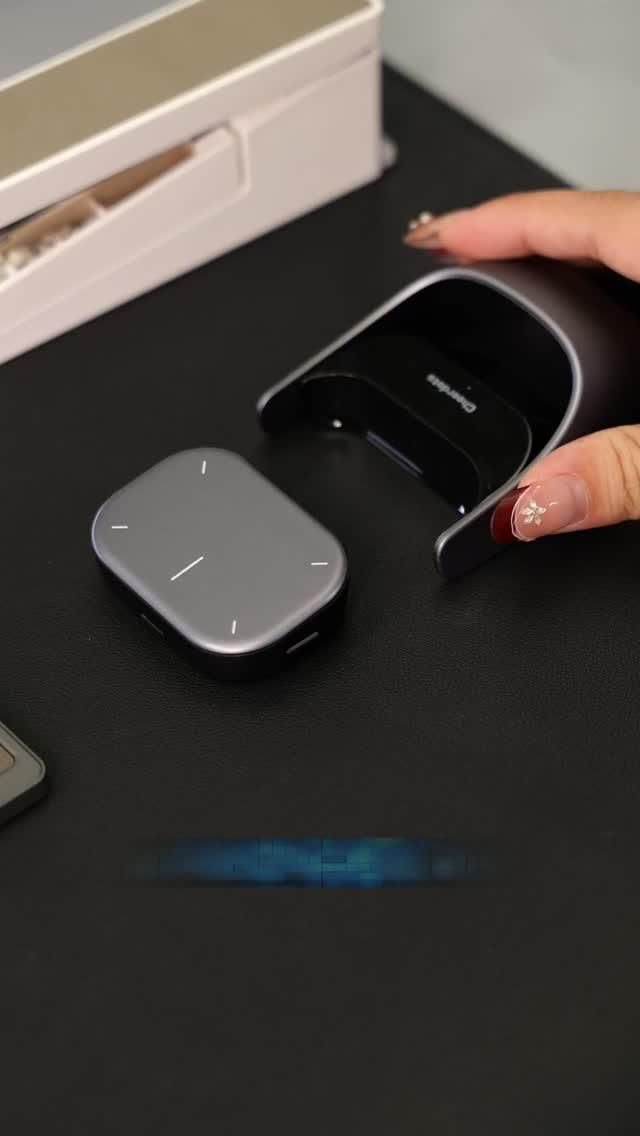
A magnetically detachable mouse that doubles as a presenter, touch controller, and portable voice tool
The Cheerdots 2 is built for people who move between desk work, presentations, and mobile setups without wanting to carry separate accessories for each task. Instead of being just another compact mouse, it uses a modular magnetic design to turn one small desktop tool into a 4-in-1 control system with mouse, touchpad-style input, air mouse/presentation control, and AI-oriented voice recording functionality.
The Standout Appeal & Why It Caught Our Attention
What makes this especially interesting is how much function Cheerdots has packed into a form that still looks clean and office-appropriate. The detachable top module appears designed to be lifted off the base and used independently, which is a smarter approach than forcing presentation controls into a bulky mouse body. It solves a very real modern workflow problem: people now switch constantly between laptop work, external displays, meetings, and phone-based productivity, yet most input devices are still single-purpose.
- Magnetic split-body construction gives it a distinct modular advantage over standard travel mice.
- Minimal gray finish and smooth rounded geometry make it blend naturally into modern desk setups rather than looking like a niche tech accessory.
- Dock-based charging and storage helps keep the detachable controller from becoming another loose item in a bag.
Key Features & How It Works
Based on the provided product context and visible design details, the Cheerdots 2 combines several control modes into one compact wireless unit.
- 4-in-1 functionality: works as a traditional wireless mouse, a touch-input controller, an air mouse for gesture-based cursor or presentation navigation, and a presentation clicker for slide control.
- AI voice recorder support: the handheld module is also positioned as a voice-capture tool, useful for recording notes, meetings, or spoken prompts for AI-assisted workflows.
- Magnetically detachable top module: the smaller rounded controller separates from the main body, letting you hold it like a remote during presentations or use it independently away from the desk.
- Charging dock included: the curved cradle keeps the unit upright, charged, and easy to grab. This also reinforces its role as a desk tool rather than a loose travel accessory.
- Bluetooth connectivity: designed for cable-free pairing with Mac and Windows systems, making it suitable for mixed-device work environments.
- Compact, portable footprint: the low-profile shape and smooth edges suggest it is intended to slip easily into a laptop sleeve or meeting bag.
- Touch-oriented surface markings: the top module shows simple directional or gesture reference lines, hinting at swipe, tap, or directional control without cluttering the design with many visible buttons.
Practical Everyday Uses
This is the kind of accessory that becomes most valuable when your workday is split across different contexts rather than one fixed desk.
- Meeting rooms and presentations: detach the controller and use it as a handheld clicker or air mouse while standing away from the laptop, instead of awkwardly returning to the keyboard to change slides.
- Hot-desk and hybrid work setups: keep one compact controller in your bag that can handle cursor movement, quick navigation, and voice note capture without packing multiple peripherals.
- Mobile productivity and note capture: for users who brainstorm verbally, the AI voice recording function can help capture ideas, meeting summaries, or task reminders when typing is inconvenient.
Things To Consider Before Buying
The concept is strong, but multifunction tools work best when their workflow matches your own habits.
- Check software and feature support: advanced functions like AI voice recording or gesture controls may depend on companion software or app integration.
- Confirm OS compatibility details: while it supports Mac and Windows, some shortcut mappings or presentation features may behave differently across platforms.
- Expect a short learning curve: a detachable controller with touch and air functions is more versatile than a normal mouse, but it may take a few days to build muscle memory.
- Consider your use case: if you only need a basic desk mouse, this may be more capability than necessary. It makes the most sense for presenters, hybrid workers, and people who value portable multi-device control.
- Keep the dock in mind: the included charging cradle is useful, but buyers should decide whether they want it permanently on a desk or packed separately for travel.